×
Menu
Index
 

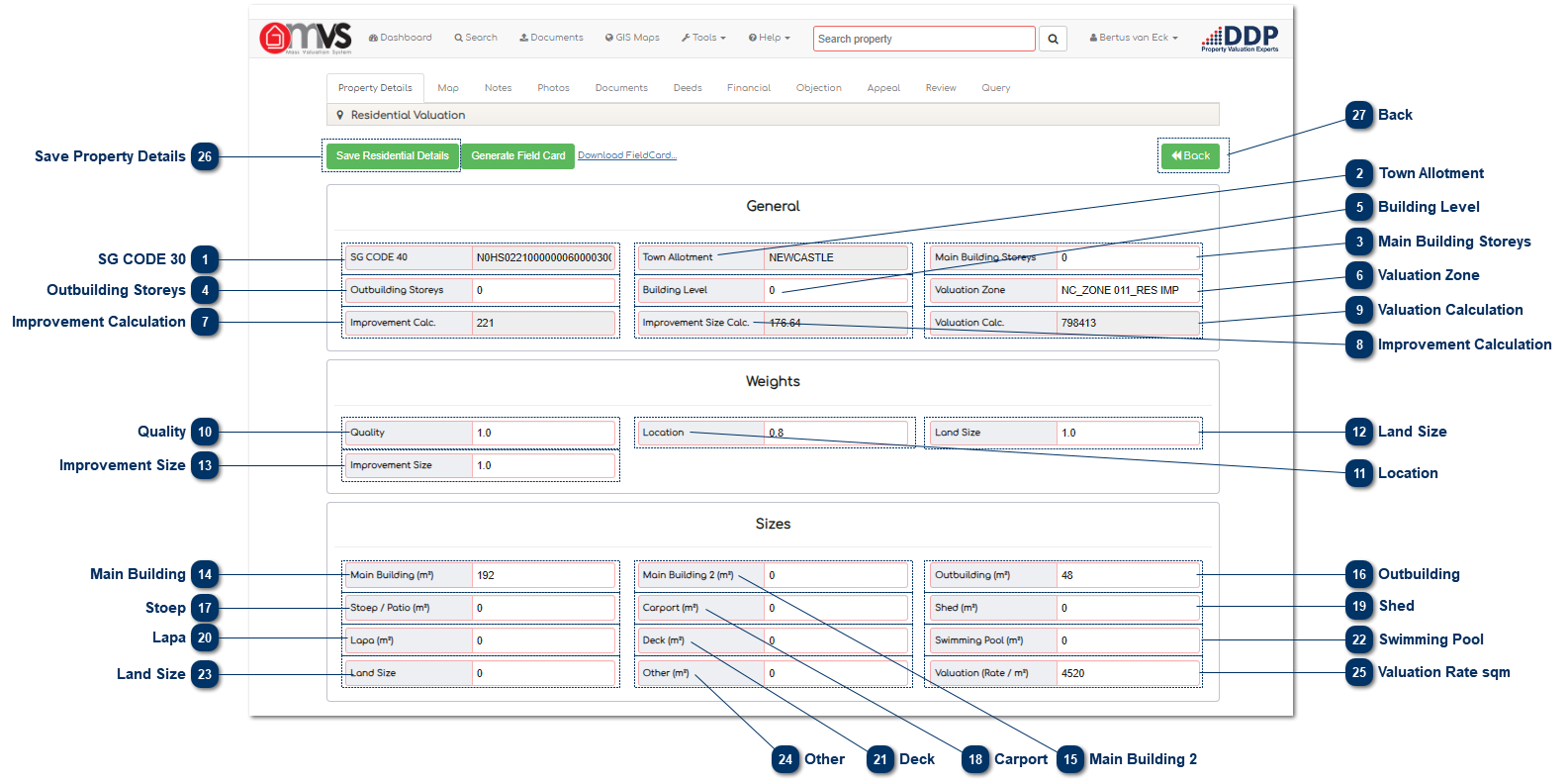
5.9.1.3.5.1. Valuation Calculation Points

 
5.9.1.3.5.1. Valuation Calculation Points
1

SG CODE 30

1. SG CODE 30
This is where the 30 SG code that is captured in the Master File is displayed. The 30 SG code is compiled with the 21 SG Code + SS Unit + Section. This field can be edited depending on the User’s rights within the MVS.
 
The System makes provision for a 40 digit SG Code, but we only use the 30 digit SG Code.
 
2

Town Allotment

2. Town Allotment
This is where the Township that is captured in the Master File is shown. This field can be edited depending on the User’s rights within the MVS.
 
3

Main Building Storeys

3. Main Building Storeys
This is the number of storeys of the main building that have been captured. This information comes from the data that was collected by the Data Collector on the Android device.
 
4

Outbuilding Storeys

4. Outbuilding Storeys
This is the number of storeys of the outbuilding captured from the data that was collected by the Data Collector on the Android device.
 
5

Building Level

5. Building Level
This is the level (%) that comprises the total floor area of the storeys. This information comes from the data that was collected by the Data Collector on the Android device.
 
6

Valuation Zone

6. Valuation Zone
This is where an area can be split up into different valuation zones.
 
7

Improvement Calculation

7. Improvement Calculation
This is the calculation that determines the adjusted area of the building sizes. The calculation is done as follows:
 
SUM = (Main Building X 100%) + (Main Building 2 X 100%) +(Stoep X 30%) + (Lapa X 30%) + (Deck X 20%) + (Carport X 30%) + (Shed X 20%) + (Other X 30%) + (Swimming Pool X 20%) + (Land Size 100%)
 
8

Improvement Calculation

8. Improvement Calculation
This is the calculation that determines the improvement size of the building, taking into account the location, quality, land size, and the improvement size. The calculation is done as follows:
 
SUM = (((Location + Quality + Land Size + Improvement Size)-3) X Improvement Calculation)
 
9

Valuation Calculation

9. Valuation Calculation
This is the calculation of the value of the property and is calculated and shown as an unrounded amount.
 
10

Quality

10. Quality
This is the weight that is given for the quality of the property.
 
11

Location

11. Location
This is the weight that is given for the location of the property.
 
12

Land Size

12. Land Size
This is the weight that is given to the land size.
 
13

Improvement Size

13. Improvement Size
This is the weight that is given to the property for the improvement size.
 
14

Main Building

14. Main Building
This is the size of the main building captured from the GIS Shape File. The data can be edited or changed if there was an error in the building size.    
 
15

Main Building 2

15. Main Building 2
This is the size of the main building captured from the GIS Shape File. The data can be edited or changed if there was an error in the building size.
 
16

Outbuilding

16. Outbuilding
This is the size of the outbuilding captured from the GIS Shape File. The data can be edited or changed if there was an error in building size.
 
17

Stoep

17. Stoep
This is the size of the stoep captured from the GIS Shape File. The data can be edited or changed if there was an error in building size.
 
18

Carport

18. Carport
This is the size of the carport captured from the GIS Shape File. The data can be edited or changed if there was an error in carport size.
 
19

Shed

19. Shed
This is the size of the shed captured from the GIS Shape File. The data can be edited or changed if there was an error in shed size.
 
20

Lapa

20. Lapa
This is the size of the lapa captured from the GIS Shape File. The data can be edited or changed if there was an error in lapa size.
 
21

Deck

21. Deck
This is the size of the deck captured from the GIS Shape File. The data can be edited or changed if there was an error in deck size.
 
22

Swimming Pool

22. Swimming Pool
This is the size of the swimming pool captured from the GIS Shape File. The data can be edited or changed if there was an error in swimming pool size.
 
23

Land Size

23. Land Size
This field is completed from the Master File and is the extent of the stand.
 
24

Other

24. Other
This is the size of any other area captured from the GIS Shape File. The data can be edited or changed if there was an error in any size.
 
25

Valuation Rate sqm

25. Valuation Rate sqm
This is where the User captures the valuation rate that was determined by the Municipal Valuer.
 
26

Save Property Details

26. Save Property Details
When the User has completed the Valuation the User must save the property details. The data will then be saved to the database.
 
27

Back

27. Back
Click the "Back" button to return to the Property Details page.
 
 
The online help was created with Dr.Explain