×
Menu
Index
 

5.9.1.3.2. Split Property

 
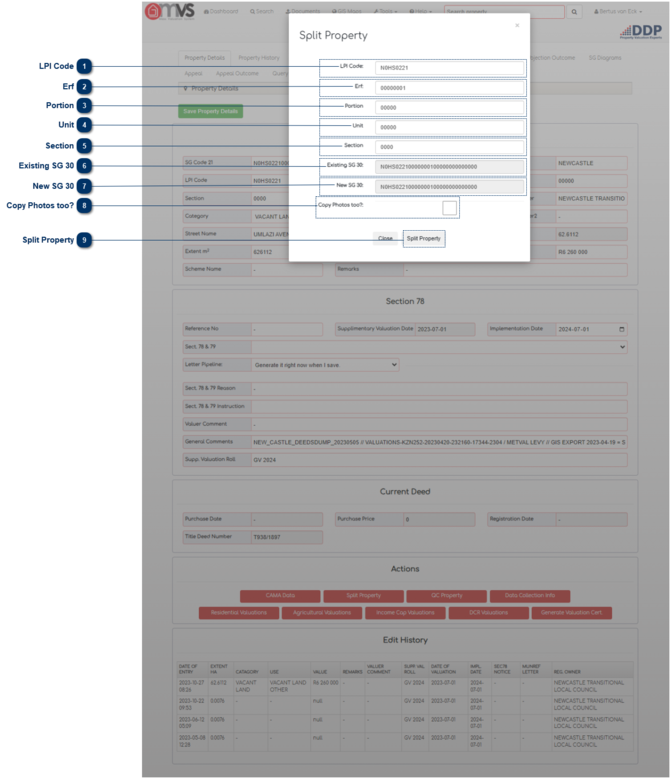
This is where the User can split the property into sections for Multiple Use properties.
 
5.9.1.3.2. Split Property
 
The property info (SG Code) will appear. The User must then complete the 30 SG Code as follows:
 
1

LPI Code

1. LPI Code
LPI
N0FS0665
(8 digits)
 
2

Erf

2. Erf
Erf
00000123
(8 digits)
 
3

Portion

3. Portion
Portion
00000
(5 digits)
 
4

Unit

4. Unit
Unit
00000
(5 digits)
 
5

Section

5. Section
Section
0001
(4 digits)
 
 
  • If a record is Multiple Use the Sub Unit section is donated as M001 and increments for each use.
  • If a record Multiple Use (M) on a Sectional Title (ST) record, the Unit Number section is number as per the unit number and the Sub Unit section is donated as M001 and increments for each use of that unit.
  • If a record is Exclusive Use (E) the Sub Unit is donated as E001 in increments for each use.
  • If the record is a Virtual Section (V) the Sub Unit is donated as V001 and the Unit Section increments for each virtual unit created.
  • If a record is for a Boat House (B) the Sub Unit is donated as B001 and increments for each Boat use.
     
6

Existing SG 30

6. Existing SG 30
This is the existing 30 SG code that is captured in the Master File as displayed. The 30 SG code is compiled with the 21 SG Code + SS Unit + Section. This field can be edited depending on the User’s rights within the MVS.
 
7

New SG 30

7. New SG 30
The new 30 SG Code will show here.
 
8

Copy Photos too?

8. Copy Photos too?
Tick the "Copy Photos too" box to copy all the photos to the new property that was created.
 
9

Split Property

9. Split Property
Tick the "Split Property" box to complete the split of the Multiple Use property.
 
The online help was created with Dr.Explain