×
Menu
Index
 

5.9.1.1. Property Details

 
5.9.1.1. Property Details
1

SG Code 21

1. SG Code 21
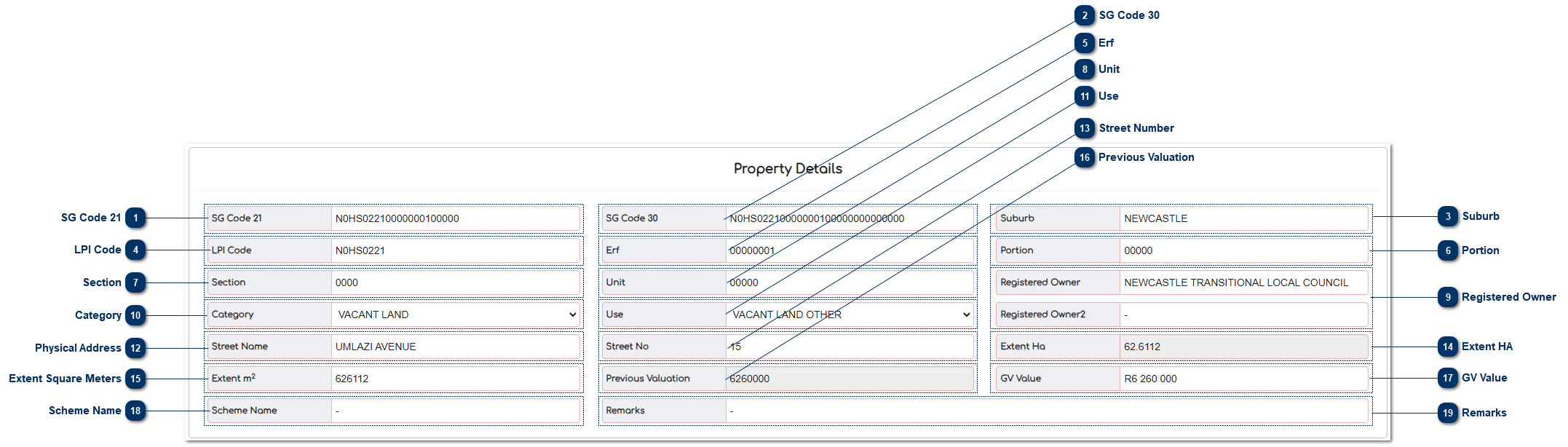
This is where the 21 SG code that is captured in the Master File is displayed. The SG code is the code that is captured in the Deeds office. This field can be edited depending on the User’s rights within the MVS.
 
2

SG Code 30

2. SG Code 30
This is where the 30 SG code that is captured in the Master File is displayed. The 30 SG code is compiled with the 21 SG Code + SS Unit + Section Unit. This field can be edited depending on the User’s rights within the MVS.
 
3

Suburb

3. Suburb
This is where the Suburb / Township that is captured in the Master File is shown. This field can be edited depending on the User’s rights within the MVS.
 
4

LPI Code

4. LPI Code
The LPI code comprises the first 8 digits of the 21 SG Code and 30 SG Code.
 
5

Erf

5. Erf
This is where the erf / stand number is captured.
 
6

Portion

6. Portion
This is where the portion number is captured.
 
7

Section

7. Section
This is where the section number is captured.
 
8

Unit

8. Unit
This is where the sectional title unit number is captured.
 
9

Registered Owner

9. Registered Owner
This is the name of owner is uploaded from the Deeds.
 
10

Category

10. Category
This is a dropdown field where the User can select the category or change the category in terms of Section 78.
 
11

Use

11. Use
This is a dropdown field where the User can select the use of the property.
 
12

Physical Address

12. Physical Address
This is the physical address of the property. The financial data will be captured and verified by the Data Collector.
 
13

Street Number

13. Street Number
This is the street number of the property. The financial data will be captured and verified by the Data Collector.
 
14

Extent HA

14. Extent HA
This is the Deeds extent in hectares that is imported from the Deeds Import.
 
15

Extent Square Meters

15. Extent Square Meters
This is the Deeds extent in square meters that is imported from the Deeds Import.
 
16

Previous Valuation

16. Previous Valuation
This is the valuation from the previous Valuation Roll is shown.
 
17

GV Value

17. GV Value
This is the value from the Valuation Roll. This field is completed from the different methodologies.
 
18

Scheme Name

18. Scheme Name
This is where the Sectional Title Scheme Name / Share Block Name that is captured in the Master File is shown. This field can be edited depending on the User’s rights within the MVS.

 
19

Remarks

19. Remarks

These are the remarks that will be displayed on the Valuation Roll and can be edited.
The online help was created with Dr.Explain