To properly display this page you need a browser with JavaScript support.
5.5.3.3.1. Override Comparable Sale Values
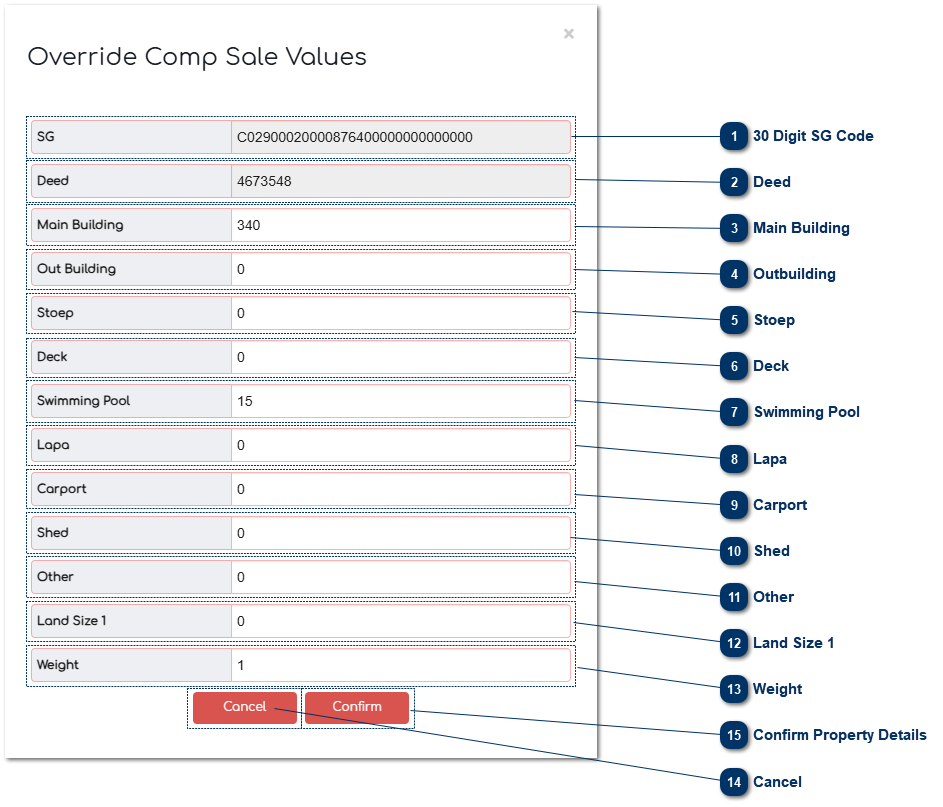
30 Digit SG Code This is where the 30 SG code that is captured in the Master File is displayed. The 30 SG code is compiled with the 21 SG Code + SS Unit + Section.
Deed This is where the Deeds unique code is displayed.
Main Building This is the size of the main building captured from the GIS Shape File. The data can be edited or changed if there is an error in the building size .
Outbuilding This is the size of the outbuilding captured from the GIS Shape File. The data can be edited or changed if there is an error in building size.
Stoep This is the size of the stoep captured from the GIS Shape File. The data can be edited or changed if there is an error in building size.
Deck This is the size of the deck captured from the GIS Shape File. The data can be edited or changed if there is an error in deck size.
Swimming Pool This is the size of the swimming pool captured from the GIS Shape File. The data can be edited or changed if there is an error in the swimming pool size.
Lapa This is the size of the lapa captured from the GIS Shape File. The data can be edited or changed if there is an error in lapa size.
Carport This is the size of the carport captured from the GIS Shape File. The data can be edited or changed if there is an error in the carport size.
Shed This is the size of the shed captured from the GIS Shape File. The data can be edited or changed if there is an error in the shed size.
Other This is the size of any other area captured from the GIS Shape File. The data can be edited or changed if there is an error in the size.
Land Size 1 This field is completed from the Master File and is the extent of the stand.
Weight This is the weight that is given for the property.
Cancel To discard any changes click on "Cancel".
Confirm Property Details Click "Confirm" to save the data to the database.